
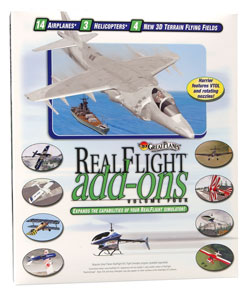
RealFlight Add-Ons Vol. 4
- Betala säkert med kort
- Maila oss, vi svarar snabbt!
- Snabba leveranser
- Öppet i butik och telefon mellan 9-18 Vardagar samt 10-15 (OBS Ny tid) på Lördagar*, ring +46 (0) 303-776303
* Vi kan vara upptagna, ring igen om vi inte svarar!
- VarumärkeGreat Planes
Beskrivning
Art.nr: K_OVR_GPMZ4104
Great Planes RealFlight simulator has become one of the most popular RC simulators on the market in recent years. With it's RealFlight Classic, RealFlight Deluxe and the latest RealFlight G2 simulators Great Planes has continually improved upon an already outstanding product.
One feature that I've always enjoyed has been the ability to purchase the "Add-Ons" for ReealFlight which instantly gives you access to exciting new airplanes, helicopters and flying fields. Each airplane or heli looks and feels very much like the real thing and can significantly increase your RC flying skills just by practicing on it. Along with sharpening your flying skills the RealFlight G2 is just pure fun and addicting.
This latest in the RealFlight series of Add-Ons is Volume 4 which includes 14 new airplanes, 3new helis and 4 new flying fields. A snapshot of each is pictured below.
 Albatros |  Edge 540* |  ElectroStreak™ |  Extra 330S* |
 Harrier |  Nobler™ |  P-40 Warhawk |  Pitts |
 RV4 |  Ryan STA |  Spectra Select™ |  Stuka |
 T-Craft |  Tutor™ |


THE HARRIER:
One of the most exciting models on this add-on volume for many, including myself, is the Harrier VTOL jump jet. With the harrier you can actually rotate the nozzles to take off vertically and once airborne rotate them for forward flight. To do this you use the rotating knob on the new G2 USB Interlink controller or if you have the older controller you can use the switch but are limited to 2 positions on the nozzles.
On takeoff you actually see the dust blowing up as created from the thrust of the nozzle blast on the ground. It is very cool. You can bring the Harrier in for a landing by reversing this process and rotating the nozzles slowly back toward vertical and then "hover" the harrier back in for a landing right in front of you. It takes a little practice at first but is lots of fun to see this aircraft perform every step of the way. It also has retractable landing gear. See the animated image below which shows the nozzle movement on the Harrier.

SOME FAVORITES:
All the new aircraft are really exciting. If you have either worn out your first 3 add-on volumes by flying them night and day and want to try something new or even if you haven't tried a single add-on this one is a winner. I found the Edge 540 and the Pitts have become 2 of my newest favorites. Aerobatics are easy to practice on these along with the Extra 330S. For those interested in helis the Kyosho Concept 30, Kyosho Caliber 30 plus the Huey are also a welcome addition to the RealFlight family. I had a great time flying these heli's around all the new flying fields. You can even hover them in the hangars in "Snow Park" (see below).
FLYING FIELD FAVORITES:
The 4 new flying fields add new dimension to the terrain available in RealFlight. I had been flying quite a bit in the "Snow Park" field which is stunning. This field has some hangars right off the runway so I thought to myself, "I wonder if I could fly through these and come out the doors on the other side intact?" So of course I tried and the answer is yes! You can actually fly the planes through the hangars and right out the other end. It is a challenging obstacle but such a blast to do. I'll be working on doing this knife edge quite soon!
The "Battleship" is also unique in that it launches your aircraft using a catapult sled. Once launched I decided to see if I could fly over to the nearest island and land on it. I learned this is in fact possible! Very cool. Rounding out the new flying fields are the "Painted Canyon" and "Crescent Rock" which are both nice easy to fly at sites.
UPGRADES:
I decided for this add-on I was going to upgrade to the USB Interlink controller now available for RealFlight G2. This is a newer interface made by Futaba which features a rotating knob so you can have proportional control on the 5th channel. Perfect for the Harrier in this case (but not needed to fly the harrier as the older models as mentioned can use a switch). It now comes with RealFlight G2 or you can get it as an upgrade to the original G2 as I did.
I also wanted the ability to use my own 9C or 9Z transmitter with the RealFlight G2. With the included cables this is possible so you get the best of both worlds. You can use the Interlink controller itself or link it up with your own transmitter. Upgrading was a breeze and was completed without any problems. Just insert the upgrade CD and upgrade the software and plug your new USB Interlink transmitter into the computers USB port. Then go fly!